Book Excerpt: Working with the DataList Control
In this chapter, we will cover the ASP.NET DataList control. We will learn about
the following:
|

|
This chapter excerpt from
ASP.NET Data Presentation Controls Essentials by Joydip Kanjilal,
is printed with permission from Packt Publishing
, Copyright 2007.
Selecting Data
In this series, we will explore how to Select, Edit, and Delete data using the
DataList control.
You need to specify the event handler that will be invoked in the OnItemCommand
event as follows:
OnItemCommand = "Employee_Select"
You also need to specify a LinkButton that the user would have to click on to
select a particular row of data in the DataList control. This command button
would be specified in the ItemTemplate as shown here:
<asp:LinkButton ID="lnkSelect" runat="server" CommandName="Select" >
Select </asp:LinkButton>
The reason why we choose to use the ItemTemplate to place the command button to
select data is that the contents of this template are rendered once for each
row of data in the DataList control. The code for the event handler is as
follows:
protected void Employee_Select(object source, DataListCommandEventArgs e)
{
DataList1.EditItemIndex = e.Item.ItemIndex;
DataList1.DataBind();
}
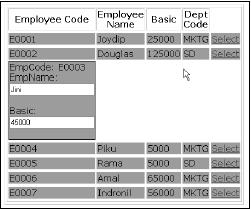
The output on execution is shown in the following screenshot.
Editing data
The DataList control can be used to edit your data, bound to this control from a
data store. This section discusses how we can edit data using this control. You
can edit data using the DataList control by providing a command-type button
control in the ItemTemplate of the DataList control. These command-type button
can be one of the following.
Button
LinkButton
ImageButton
In our example, we will be using an ImageButton control. Further, you need to
specify the OnEditCommand event and the corresponding event handler that will
be triggered whenever the user wants to edit data in the DataList control by
clicking on the ImageButton meant for editing the data.
The following code listing shows how your .aspx code for this control with edit
mode enabled would look:
<asp:DataList ID="DataList1" DataKeyField= "EmpCode" GridLines = "Both"
CellPadding="3"
CellSpacing="0"
Font-Names="Verdana"
Font-Size="12pt"
Width="150px"
OnEditCommand = "Employee_Edit" runat="server">
<HeaderTemplate>
<table border="1">
<tr>
<th>
Employee Code
</th>
<th>
Employee Name
</th>
<th>
Basic
</th>
<th>
Dept Code
</th>
</tr>
</HeaderTemplate>
<EditItemTemplate>
EmpCode: <asp:Label ID="lblEmpCode" runat="server"
Text='<%# Eval("EmpCode") %>'>
</asp:Label>
<br />
EmpName: <asp:TextBox ID="txtEmpName" runat="server"
Text='<%#DataBinder.Eval(Container.DataItem,"EmpName") %>'>
</asp:TextBox>
<br />
Basic: <asp:TextBox ID="txtBasic" runat="server"
Text='<%# DataBinder.Eval(Container.DataItem,"Basic") %>'>
</asp:TextBox>
<br />
</EditItemTemplate>
<ItemTemplate>
<tr
bgcolor="#0xbbbb">
<td>
<%# DataBinder.Eval(Container.DataItem,"EmpCode")%>
</td>
<td>
<%# DataBinder.Eval(Container.DataItem,"EmpName")%>
</td>
<td>
<%# DataBinder.Eval(Container.DataItem,"Basic")%>
</td>
<td>
<%# DataBinder.Eval(Container.DataItem,"DeptCode")%>
</td>
<td>
<asp:LinkButton
ID=lnkEdit runat=server
CommandName=Edit >
Edit
</asp:LinkButton>
</td>
</tr>
</ItemTemplate>
</asp:DataList>
The corresponding event handler to handle the edit operation, Employee_Edit, is
defined as follows:
protected void Employee_Edit(object source, DataListCommandEventArgs e)
{
DataList1.EditItemIndex = e.Item.ItemIndex;
DataList1.DataBind();
}
The .ItemIndex property of the DataListCommandEventArgs instance gives us the
row index of the DataList control that is being edited. This index starts with
a value of zero, that is, the index for the fi rst row of data that is rendered
in the DataList control is 0.
The following screenshot shows the output on execution.
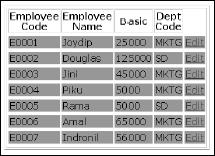
Note that the Edit command button is rendered for each of the rows of the
DataList control. Now, when you click on this button on any of the rows to edit
the data for that row, the output is as follows:
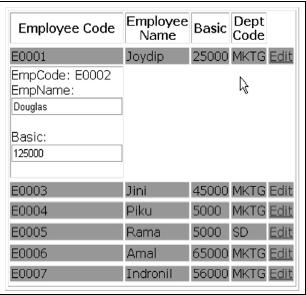
Note that the second record is set to editable mode on clicking the Edit command
button that corresponds to the second record.
Deleting Data
This section discusses how we can delete data using the DataList control.
Similar to what we have done in the previous section for editing data using the
DataList control, you need to specify the event handler that will be triggered
for the delete operation in the .aspx fi le. You also require a LinkButton as
usual.
The following code snippet illustrates the code that you need to write for the
.aspx file to specify the event handler that will be invoked for the delete
operation.
OnDeleteCommand = "Employee_Delete"
The code for the Employee_Delete event handler that you need to write in the
code-behind file, that is, DataList.aspx.cs, is as follows:
protected void Employee_Delete(object source, DataListCommandEventArgs e)
{
DataList1.EditItemIndex = e.Item.ItemIndex;
//Code to delete the row represented by
ItemIndex
DataList1.EditItemIndex = -1; //Reset the
index
DataList1.DataBind();
}
The following is the output on execution.
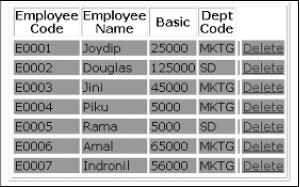
As is apparent from the given screenshot, you just need to click the Delete Link
Button that corresponds to the employee record that you need to delete. Once
you do so, the specific record gets deleted.
Summary
We have had a bird's eye view of the DataList control in this chapter and how we
can use it in our ASP.NET applications. We have discussed how to select, edit,
and delete data with this control and how to work with the events of this
control. We also discussed how we can bind images to the DataList control
programmatically. The next chapter will discuss the DataGrid control, one of
the most widely used data controls in ASP.NET.
Also read
Selecting, editing and delete
data using DataList control
We will explore how to Select, Edit, and Delete data using the DataList
control.............
ASP.NET Handling the DataList control events
The Repeater, DataList, and DataGrid controls support event bubbling. What is
event bubbling? Event Bubbling refers to the ability of a control to capture
the events in a child control and bubble up the event to the container whenever
an event occurs........
ASP.NET and its Methodologies
ASP.NET attempts to make the web development methodology like the GUI
development methodology by allowing developers to build pages made up of
controls similar to a GUI...............
Problems ASP.NET Solves
Microsoft has released various web application development methodologies since
the shipment of IIS in Windows. Why do developers need ASP.NET? What problems
does ASP.NET solve that the previous development methodologies did not
solve?............
ASP.NET issues
The truth is that ASP.NET has several issues that need to be
addressed.............
Page Controller Pattern in
ASP.NET
Here it shows how a page controller pattern works in ASP.NET.
MVC Design
MVC, which stands for Model View Controller, is a design pattern that helps us
achieve the decoupling of data access and business logic from the presentation
code , and also gives us the opportunity to unit test the GUI effectively and
neatly, without worrying about GUI changes at all..........
|



