Find jobs | Jobseekers
Employer login
About us Sitemap of www.CareerRide.com Sitemap FAQ related with www.CareerRide.com FAQ Click here to Contact us Contact
       
Submit Resume Free ! | Access Resume Free !
Home Career Services Resume Services Interview questions Articles Books
Content
Oracle interview
Oracle architecture
Oracle processes
Oracle memory area
Oracle file types
Oracle database objects
Oracle operators
Oracle composite
Oracle constraints
Oracle data types
Oracle DCL and TCL
Oracle DML commands
Oracle error handling
Oracle functions
Oracle function, procedure, package
Oracle import and export
Oracle sub queries
Oracle table
Oracle triggers
Oracle views
Oracle synonym
Oracle indexes
Oracle joins
Oracle cursors
Oracle form
Oracle security
Oracle system privilege
Oracle object privileges
Oracle table privileges
Oracle view privileges
Oracle backup & recovery
Oracle DBA
Oracle PL/SQL
Oracle nested table & varrays
Oracle large objects
Oracle replication
Oracle transaction
Oracle optimizer
Oracle auditing
Oracle backup
Oracle database tuning
Oracle application tuning
Oracle procedures
Oracle functions
Oracle loops
Oracle exceptions
Oracle Select into clause
Oracle string functions
Oracle numeric functions
Oracle date functions
Oracle translate and decode
Oracle correlated sub-queries
Oracle union, intersect and minus
Oracle clusters
Oracle sequences
Oracle tablespaces
Oracle object datatypes
 
ASP.NET
ADO.NET
NET Remoting
NET Interview
C#.NET
VB.NET
AJAX
 
PHP
 
C
C++
Java
Data Structure
Oops
 
Database concepts
SQL Server
MySQL
Data warehousing
Service-oriented architecture
SQL Server notification services
SQL Server Reporting Services
Sharepoint
Biztalk interview questions
 
Operating System
Project Management
Linux
Testing
Networking
Software engineering
 
UML
XML
HTML
SOAP
CSS
VBScript
 
CV tips
Cover letter tips
Interview tips
Human resources
Soft skills
Group discussion

Oracle's ODP.NET


Presenting Master-Detail Information Using a Dataset

As mentioned before, a DataSet object can have its own relations between data tables existing in it. We can add these relations dynamically at the client side (within an application), to represent master-detail (or hierarchical) information. The following code gives the list of employees (in the bottom grid) based on the department you choose in the top grid:

Imports Oracle.DataAccess.Client
Public Class Form8

Private Sub btnData_Click(ByVal sender As
System.Object, ByVal e As System.EventArgs) Handles btnData.Click
'create connection to db
Dim cn As New OracleConnection("Data Source=xe; _
UserId=scott;Password=tiger")
Try
Dim ds As New DataSet
Dim adp As OracleDataAdapter
adp = New OracleDataAdapter("SELECT deptno,
dname, loc FROM Dept", cn)
adp.Fill(ds, "Departments")
adp.Dispose()
adp = New OracleDataAdapter("SELECT empno, ename,
job, mgr, hiredate, sal, comm, deptno FROM
Emp", cn)
adp.Fill(ds, "Employees")
adp.Dispose()
ds.Relations.Add(New DataRelation("FK_Emp_Dept",
ds.Tables("Departments").Columns("Deptno"),
ds.Tables("Employees").Columns("Deptno")))
Dim bsMaster As New BindingSource(ds, _
"Departments")
Dim bsChild As New BindingSource(bsMaster, _
"FK_Emp_Dept")
Me.DataGridView1.DataSource = bsMaster
Me.DataGridView2.DataSource = bsChild
Catch ex As Exception
'display if any error occurs
MessageBox.Show("Error: " & ex.Message)
'close the connection if it is still open
If cn.State = ConnectionState.Open Then
cn.Close()
End If
End Try
End Sub
End Class

 
  Book Excerpt: Retrieving Data from Oracle
  Using ODP.NET
  Chapter Contents

This excerpt from ODP.NET Developer's Guide: Oracle Database 10g Development with Visual Studio 2005 and the Oracle Data Provider for .NET  by Jagadish Chatarji Pulakhandam, Sunitha Paruchuri, is printed with permission from Packt Publishing, Copyright 2007. 


Related Links
>Oracle Interview Questions
>Working with ASP.NET DataList Control
>.Net Framework Interview Questions
>ASP.NET Tutorial
>ASP.NET Interview questions
>Remoting.Net
>ASP.NET Validation Control
>.NET Assembly
>ADO.NET

Once the DataSet is filled with data tables (Departments and Employees), we can add an in-memory relation using the following statement:

ds.Relations.Add(New DataRelation("FK_Emp_Dept",
ds.Tables("Departments").Columns("Deptno"),
ds.Tables("Employees").Columns("Deptno")))

The above statement simply adds a new relation (named FK_Emp_Dept) between two DataTable objects (Departments and Employees) based on the column Deptno (available in both DataTable objects).

To present the information in a master-detail fashion, we can make use of the BindingSource object as follows:

Dim bsMaster As New BindingSource(ds, "Departments")
Dim bsChild As New BindingSource(bsMaster, "FK_Emp_Dept")

In the above code fragment, we used two BindingSource objects corresponding to master and child data tables respectively. The child BindingSource object is created based on the master BindingSource object together with the specification of DataRelation. Once the BindingSource objects are ready, we can assign them as data sources to the DataGridView controls as following:

Me.DataGridView1.DataSource = bsMaster
Me.DataGridView2.DataSource = bsChild

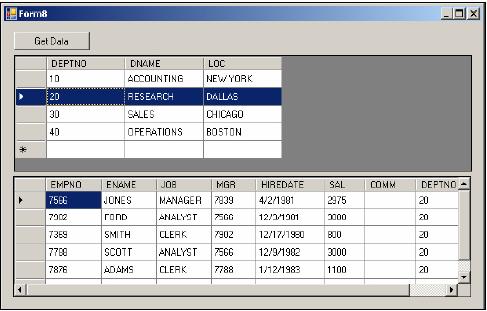
The output for the above code would look similar to the following figure:

You can observe that this screen displays only the employees working in department number 20 as that is selected in the top grid.


Page 1 | Page 2 | page 3 | page 4 | page 5 | page 6 | page 7 | page 8


Today's Hot Jobs
C++  SQL Server
.NET  Java  Oracle
Finance  Marketing
Seekers  Employers
Copyright © 2008 CareerRide.com. All rights reserved.