Complete Guide to Write a Good Email at TCS NQT | Verbal Ability as per Latest Pattern
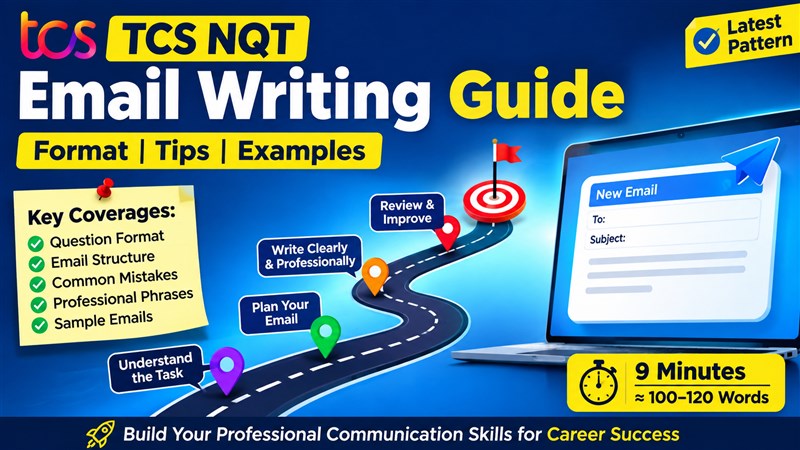
TCS NQT recently made a major change to their Verbal Ability section. And, one of the biggest additions is a question on E-mail Writing.In this question – A topic is given to you and you are expected to write an e-mail of about 100 words. The time limit given is 9 minutes.
The topics that students have reported are majorly formal – official topics.
It’s important to understand -
- What is purpose of including this question?
- The common mistake candidates commit
- A little insight into how your content is evaluated
- Format of a good e-mail – important sections
- Some common phrases you can use in official emails
- Some sample e-mails
Format of the question:
Topics: Formal / OfficialTime limit: 9 minutes
Word count: Approx 100 words.
It’s long enough to capture all the important details and short enough to be completed in 9 minutes.
Also – when you are taking a competitive exam – it is best to be prepared for some last minute surprises. That’s what being competitive is about.
Ok. Now, coming to
Why did TCS NQT introduce this section? What are they trying to find out about the candidates?
Till now, the Verbal Ability section mainly tested your English—grammar, vocabulary, and comprehension. But with the introduction of Email Writing, TCS is assessing something much more important: your professional communication skills.
Even on your first day at work - You'll be expected to communicate with your manager, teammates, HR, clients, or even the IT support team through emails.
And, the test basically wants to find out whether you can communicate clearly, politely, and professionally in such workplace situations.
So, don’t look at this as another exam hurdle to pass. It is a career skill that every candidate in today’s corporate world must possess.
Some Common Mistakes
1. AI can write e-mails for meMany students think, "Why should I prepare for Email Writing? AI can write emails for me."
That's true—but only after you tell AI what the situation is, what information to include, and what outcome you want. Even then, you need to check whether the email is accurate, complete, and professional.
In the TCS NQT exam, you won't have AI to do that for you. You'll have just 9 minutes to understand the situation and write the email yourself. So, don't take this section lightly. A little practice can make a big difference.
2. Taking grammar for granted
Many students think, "Grammar is no longer a separate section, so I don't need to prepare it." That's a mistake.
Email Writing may not test grammar directly through questions, but your grammar still matters. Incorrect sentence construction, wrong verb forms, or punctuation mistakes can make your email look unprofessional and affect the overall quality.
So, don't stop practicing grammar. Instead, focus on applying it while writing clear and professional emails.
3. Using fancy vocabulary or difficult phrases
Many students think that using difficult words will impress the examiner. It won't.
A professional email is expected to be clear, simple, and easy to understand. So, just focus on correctness and clarity.
4. Wrong tone
The tone depends on who you're writing to. An email to your manager or HR should be formal, while an email to a teammate can be slightly less formal—but always professional. Read the question carefully before you start writing.
5. Using SMS language or Casual slang
Avoid shortcuts like u, plz, thx, ASAP!! or emojis. Write complete words and maintain a professional tone throughout.
6. Over/ under word
Write too less and you won’t be able to convey the complete message.
Write too less and you’ll land up diluting the essence of the message. And, you won’t even get more marks to write more.
Focus on – being to the point. Keep the email concise, complete, and focused on the purpose.
That’s the perfect balance.
What is the right approach?
1. Think Before You Start WritingDon't start typing the moment you read the question. Spend a little time planning.A good time distribution for the 9-minute task is:
- 1 minute – Read the question carefully.
- 2 minutes – Decide the purpose, key points, and the tone.
- 5 minutes – Write the email.
- 1 minute – Review it for grammar, spelling, and missing details.
2. State the Purpose Clearly
Professional emails are usually direct and to the point. Don't keep the reader guessing.
Mention the purpose of your email in the opening sentence itself, and then provide only the relevant details.
3. Use Bullet Points Wherever Appropriate
If you're listing documents, mentioning multiple issues, or highlighting action items, use bullet points. They make your email easier to read and ensure that important information doesn't get missed.
Don't hesitate to use them—they're commonly used in professional emails.
4. Build Professional Vocabulary
You don't need fancy words, but you do need the right words.
Every workplace situation has commonly used expressions such as I would like to request..., Please find attached..., Kindly look into the matter..., or I would appreciate your assistance...
These are examples of professional or contextual vocabulary. Interestingly, this is the same skill that TCS also tests in the Sentence Completion section. The more such phrases you know, the more natural and professional your email will sound.
The Right Format
Now let's understand the format of an email. The good news is—it's very simple. You don't have to memorize anything complicated.1. Subject
This is the first thing the recipient sees. It should clearly tell the reader what the email is about.
Examples:
- Request for Leave rather than "I need Leave"
- Laptop Login Issue rather than "My laptop is not working"
- Confirmation of Training Attendance rather than "My training confirmation"
2. Greeting
Start with a polite greeting.
Examples:
- Dear Sir/Madam,
- Dear Mr. Sharma,
- Dear HR Team,
3. Opening
In the very first sentence, tell the reader why you are writing.
For example:
- I am writing to request...
- I would like to inform you...
- I am writing regarding...
4. Body
Now provide the necessary details.
This is where most students get confused. They either write too little or include unnecessary details.
A simple way to organize your thoughts is the 4W + 1H Formula. Ask yourself:
- What is the purpose?
- Why are you writing?
- When did it happen?
- Where (if needed)?
- How should it be resolved?
This simple framework ensures that your email is complete, well-organized, and easy for the reader to understand
5. Closing
End the email by clearly stating what you expect from the recipient.
Examples:
- Kindly approve my request.
- I would appreciate your assistance.
- I look forward to your response.
6. Sign-off
Close the email professionally.
Many students get confused between Yours sincerely, Yours faithfully, Yours truly, and so on. You don't need to worry about these distinctions for the TCS NQT.
The safest and most professional sign-off for almost every TCS NQT email is simply:
Regards,
ABC
It's simple, professional, and appropriate for almost all workplace situations.
8 Action Verbs to use in Professional E-mails
Use these words wherever appropriate to make your emails sound more professional. And, this is the fastest way to make your communication style look ready for the corporate world.
- "Acknowledge": Instead of saying "I got your email," use "I acknowledge the receipt of your email."
- "Collaborate": Instead of saying "Let's work together," use "I look forward to collaborating with the team."
- "Escalate": Instead of saying "I'll complain to the higher authorities," use "The issue may need to be escalated if it remains unresolved."
- "Expedite": Instead of saying "Please do it quickly," use "Kindly expedite the approval process."
- "Appreciate": Instead of saying "Thanks for helping me," use "I sincerely appreciate your support and guidance."
- "Clarify": Instead of saying "Please explain," use "Could you please clarify the project requirements?"
- "Assist": Instead of saying "Please help me," use "I would appreciate your assistance in resolving this issue."
- "Confirm": Instead of saying "Please tell me if it's fixed," use "Kindly confirm your availability for the meeting."
Sample Email 1:
Your manager has asked you to share feedback on your teammate, Rahul, who recently worked with you on a project. Write an email giving balanced and professional feedback.Subject: Feedback on Rahul's Performance
Dear Sir,
I am writing to share my feedback on Rahul's performance during our recent project.
Rahul is sincere, hardworking, and completes his assigned tasks on time. He communicates well with team members and is always willing to help whenever required. His positive attitude and commitment contributed to the successful completion of the project.
One area where he can improve is presenting his ideas more confidently during team discussions. With a little more confidence, he can contribute even more effectively.
Overall, Rahul has been a valuable team member, and I appreciate his efforts and support.
Regards,
ABC
Dear Sir,
I am writing to share my feedback on Rahul's performance during our recent project.
Rahul is sincere, hardworking, and completes his assigned tasks on time. He communicates well with team members and is always willing to help whenever required. His positive attitude and commitment contributed to the successful completion of the project.
One area where he can improve is presenting his ideas more confidently during team discussions. With a little more confidence, he can contribute even more effectively.
Overall, Rahul has been a valuable team member, and I appreciate his efforts and support.
Regards,
ABC
Sample Email 2
You have recently received an offer letter from XYZ Technologies for the position of Software Engineer. According to the offer letter, you are required to join the company on 1st August 2026. However, due to unavoidable personal reasons, you will not be able to join on the scheduled date.Subject: Request to Change Joining Date
Dear HR Manager,
I hope you are doing well.
I am delighted to have received the offer letter for the position of Software Engineer at XYZ Technologies. Thank you for giving me this opportunity.
I am writing to request a change in my joining date. Due to unavoidable personal reasons, I will not be able to join on 1st August 2026. I kindly request you to consider postponing my joining date to 15th August 2026.
I sincerely apologize for any inconvenience this may cause.
Thank you for your understanding and consideration.
I look forward to your positive response.
Regards,
ABC
Dear HR Manager,
I hope you are doing well.
I am delighted to have received the offer letter for the position of Software Engineer at XYZ Technologies. Thank you for giving me this opportunity.
I am writing to request a change in my joining date. Due to unavoidable personal reasons, I will not be able to join on 1st August 2026. I kindly request you to consider postponing my joining date to 15th August 2026.
I sincerely apologize for any inconvenience this may cause.
Thank you for your understanding and consideration.
I look forward to your positive response.
Regards,
ABC